Color Tunnel Unblocked — Play Free Online
More Runners & Driving games






Color Tunnel unblocked: play Color Tunnel online free right here in your browser — no download, no sign-up, works on a school Chromebook.
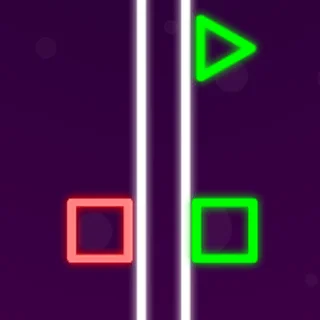
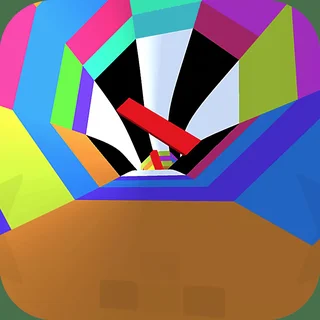
Color Tunnel throws you into a vibrant, rapidly shifting cylindrical raceway where survival depends entirely on quick eyes and steady reflexes. You glide forward at breakneck speed, navigating through geometric channels decorated in kaleidoscopic hues while dodging sudden barricades, spinning discs, and shifting wedge barriers. It delivers an immediate rush that tests how far down the track you can anticipate incoming danger.
While many titles on Poppy Playtime center around suspenseful tension and deliberate puzzle solving, Color Tunnel provides a sharp change of pace. It offers pure, instantaneous momentum where a single split-second mistake ends the attempt, immediately resetting the action so you can jump straight back into another dash.
How to play
Guiding your path through the tunnel is straightforward, but mastering high speeds takes precision. Steering along the inner curvature requires only basic inputs:
- Left and Right Arrows / A and D: Rotate your movement left or right along the curved wall.
- Up Arrow / Space: Quick bursts or jumps when navigating specific obstacles in supported sections.
- Touch Controls: Tap or drag left and right across touch-enabled screens.
- Restart: Hit any key or tap the screen immediately after a collision to launch a fresh run.
Each stage introduces new visual motifs and obstacle formations. Red triangular wedges remain stationary, while colorful circular discs rotate across the center path. Passing through each threshold smoothly shifts the color palette and increases velocity, leaving less room for hesitation.
Tips for longer runs
Setting a high score in Color Tunnel demands discipline rather than frantic key tapping. Keep these strategies in mind during your attempts:
- Look down the center: Focus your gaze further ahead into the middle of the tunnel rather than directly at the bottom of your screen. Spotting incoming obstacles early gives your hands time to adjust before you reach the barrier.
- Use feather taps instead of holding keys: Holding a directional key causes rapid oversteering that often sends you into the opposite wall. Gentle, rhythmic taps give you tighter control over your positioning.
- Track rotation rhythms: Spinning obstacles turn at steady speeds. Line up your angle to pass through where the gap will open, rather than steering toward where the opening currently sits.
Similar games on Poppy Playtime
If you enjoy high-intensity challenges between puzzle runs, the catalogue features several other fast-paced titles. Stickman vs Huggy Wuggy and Choo-Choo Charles Revenge deliver intense reflex-heavy action with relentless pacing, while Poppy Playtime and Amanda the Adventurer offer atmosphere-driven mystery when you are ready to switch from twitch reactions back to story exploration.
Questions about Color Tunnel
Is Color Tunnel unblocked at school?
Color Tunnel runs in an ordinary browser tab from poppysplaytime.org, with nothing to download or install, so it plays on most school Chromebooks and work computers. If a network filter blocks the site, only that network's administrator can change it.
What are the primary controls for Color Tunnel?
Use the Left and Right Arrow keys or the A and D keys to steer along the tunnel walls. On touch screens and mobile devices, tap or drag on either side of the screen to guide your momentum.
How does difficulty increase during a run?
As your run progresses, the movement speed gradually climbs while tunnel patterns change hue and introduce more complex obstacles like rotating semi-circles, sliding bars, and narrow gaps.
Does Color Tunnel save your progress or high score?
Color Tunnel is an endless arcade reflex game focused on setting single-run distance records. Each attempt starts fresh from the beginning immediately after a collision.
Can I play Color Tunnel on a Chromebook or mobile device?
Yes. The game runs directly in modern desktop and mobile browsers via HTML5, requiring no separate download, installation, or account setup.